Case Study · IoT & Security UX
KeyStone a secure locker system for businesses
KeyStone is a mobile-app based locker system available for businesses. It allows employees to reserve, and unlock physical storage lockers using their smartphone. I used this project as an opportunity to focus on bridging the gap between physical and digital access controls while merging usability with security.
Overview
Bridging the gap between physical and digital access
KeyStone is a mobile-app based locker system available for businesses. It allows employees to reserve, and unlock physical storage lockers using their smartphone. I used this project as an opportunity to focus on bridging the gap between physical and digital access controls while merging usability with security.
The Challenge
Addressing security and usability issues
Physical locker management in modern flexible offices tends to suffer from multitude of security and usability issues. However transitioning physical storage controls entirely to a mobile app introduced a new set of challenges that needed to be addressed:
-
01
Learnability: Users need to quickly and securely authenticate before accessing physical property.
-
02
Anxiety Around Device Theft/Loss: Providing users with peace of mind and immediate control if their primary mobile device is lost or stolen.
-
03
Safe locking: Ensuring the users can safely unlock and lock the lockers without having to worry about closing slips.
Solution
Balances convenience with security safeguards
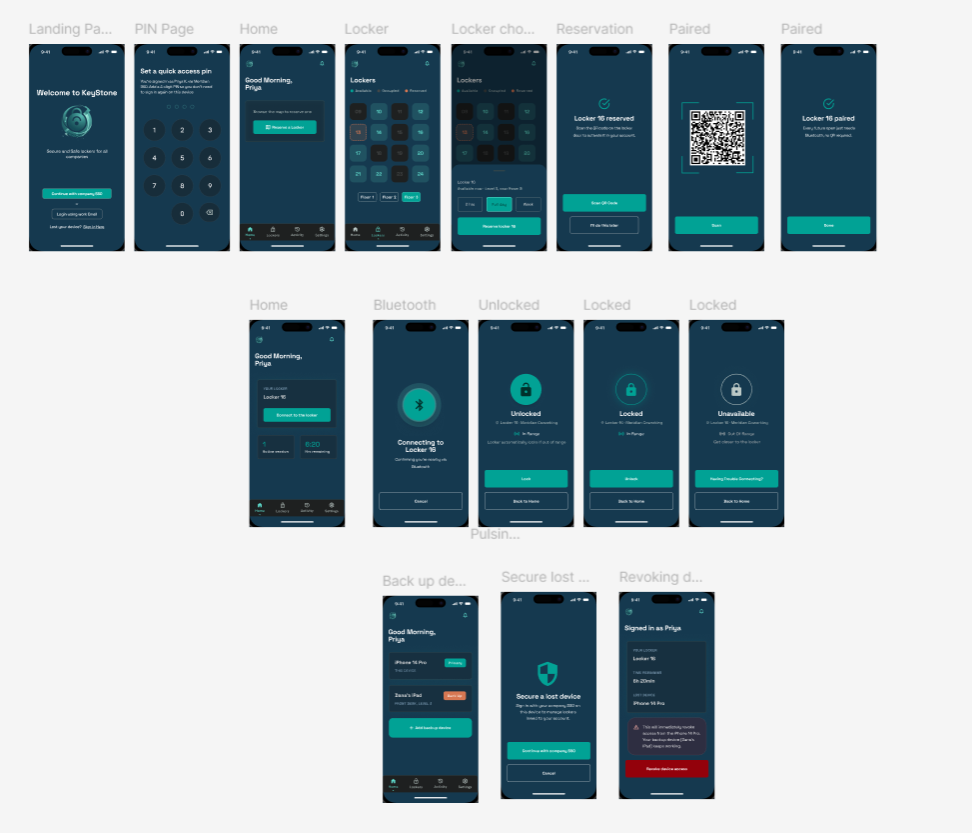
To resolve these challenges, the app is structured as a continuous user journey that balances convenience with security safeguards.
Users authenticate via corporate SSO to verify employment, then set a quick-access 4-digit PIN so the next office visit feels faster and less tiring.
A clear status grid helps users instantly understand whether lockers are Available, Occupied, or Reserved.
After QR pairing, a pulsing connection screen signals active Bluetooth control. Once in range, the user can lock or unlock the locker with confidence.
The system helps prevent closing slips by auto-locking when the user moves too far away, removing the need to rely on memory or manual checks.
To address the risk of theft or device loss, users can register backup devices and revoke access remotely when necessary.
Design
Designing the layout and flow of the app
I created the first design using Figma while incorporating elements from Stitch AI. Designing manually with a pinch of AI helped me stay in control of the creative process while moving faster. At this point, aesthetics were not the priority. I wanted to focus first on the security and usability of the product.
Testing
Testing the experience with real users
I tested the app with a range of users, including people with and without UX backgrounds. The goal was to uncover friction, gauge trust in the security model, and understand where the app could feel more confident and clear.
Questions
-
01
Was there any moment when you felt stuck and why?
-
02
Were there any gaps that made the app feel less secure, and how would you fix them?
-
03
Would you change anything in the design, layout, or visuals to make it more attractive?
Feedback
-
“
The design is comprehensible and consistent with basic apps nowadays.
-
“
The app was easy to use.
-
“
There was not a single moment when I felt stuck, or felt that the app’s functions lacked anything in terms of security.
However, the feedback also pointed to one clear weakness: the app’s visuals felt too generic. That feedback became the focus for the next stage.
Development
Making the app fully interactive and more visually compelling
When it came to development, I used Claude to turn my Figma frames into code. I focused here on functionality and interactivity first, while adding colors that pop and making the whole experience feel more polished and confident.
Live Playable Prototype
Try it out Yourself!
Click, tap, and interact with the device simulator below to experience the entire secure cohesive flow.
Locker 16
Available now • Level 3, near Room 3
Welcome to KeyStone
Secure and Safe lockers for all companies
Set a quick access pin
You're signed in as Priya K. via Meridian SSO. Add a 4-digit PIN so you don't need to sign in again on this device.
Good Morning,
Priya
Browse the map to reserve one
Find open lockers on any floor of the workspace
Lockers
Locker 16 reserved
Scan the QR code on the locker door to activate it in your account.
Locker Pairing
Align the QR code within the frame boundary
Locker 16 paired
Every future open just requires Bluetooth, no QR required.
Good Morning,
Priya
Connecting to Locker 16
Confirming you're nearby via Bluetooth...
Unlocked
Locker 16 • Meridian Coworking
Good Morning,
Priya
Backup devices
iPhone 14 Pro
THIS DEVICE
Dana's iPad
FRONT DESK, LEVEL 3
Secure a lost device
Sign in with your company SSO on this device to manage lockers linked to your account.
Signed in as Priya
This will immediately revoke access from the iPhone 14 Pro. Your backup device (Dana's iPad) keeps working.